Configure AI Models
These are your model provider's keys
This page is about API keys from model providers such as DeepSeek or Claude. You enter them under Settings → AI so Vibe Seller can call the model. They are not the Vibe Seller API keys generated under Settings → Integrations → API keys — those let external AI tools such as Claude or Codex connect to Vibe Seller; see MCP Setup.
Vibe Seller itself is free; the AI model doing the work runs on your own API key. Think of it as a password plus billing account the model provider gives you: Vibe Seller uses it to call the model, and the cost lands on your account with that provider.
This page covers three things for each provider: where to sign up, where to click to create the key, and which preset to pick in Vibe Seller. New to all this? Start with "Which provider?" below.
Contents
- Which provider?
- The general flow
- Getting a key, provider by provider:
- FAQ
Which provider?
| Your situation | Suggestion |
|---|---|
| First time, just want to try it | DeepSeek: sign up, top up a few dollars, pay per use, no monthly fee |
| Claude Code on this machine is already signed in to a Claude subscription | No key needed — reuse it, see Claude |
| Running every day, heavy usage, want it cheaper | Buy a plan (Token Plan / Coding Plan / M Plan) from one provider |
| Your account is outside mainland China | Kimi, MiniMax, GLM, Qwen and MiMo all have international versions — just pick the "International" option (for MiMo: Singapore / Europe) |
Pay-as-you-go vs. a plan
- Pay-as-you-go: top up, then pay for the tokens (the text the model reads and writes) you actually use.
- Plan (Token Plan / Coding Plan / M Plan, etc.): a fixed monthly price for a quota, usually capped by both a rolling 5-hour window and a weekly limit; cheaper per token if you use a lot.
- A plan key and a pay-as-you-go key are different keys, from different pages in the console, and they are not interchangeable. Where Vibe Seller has a preset with "Plan" in its name, a plan key needs that preset.
The general flow
Every provider follows these steps; the sections below only cover what differs:
- Sign up on the provider's site (mainland-China platforms usually want a phone number and may require real-name verification before you pay).
- Top up (pay-as-you-go) or buy a plan.
- Create an API key in the console and copy it right away — many providers show it in full only once.
- In Vibe Seller:
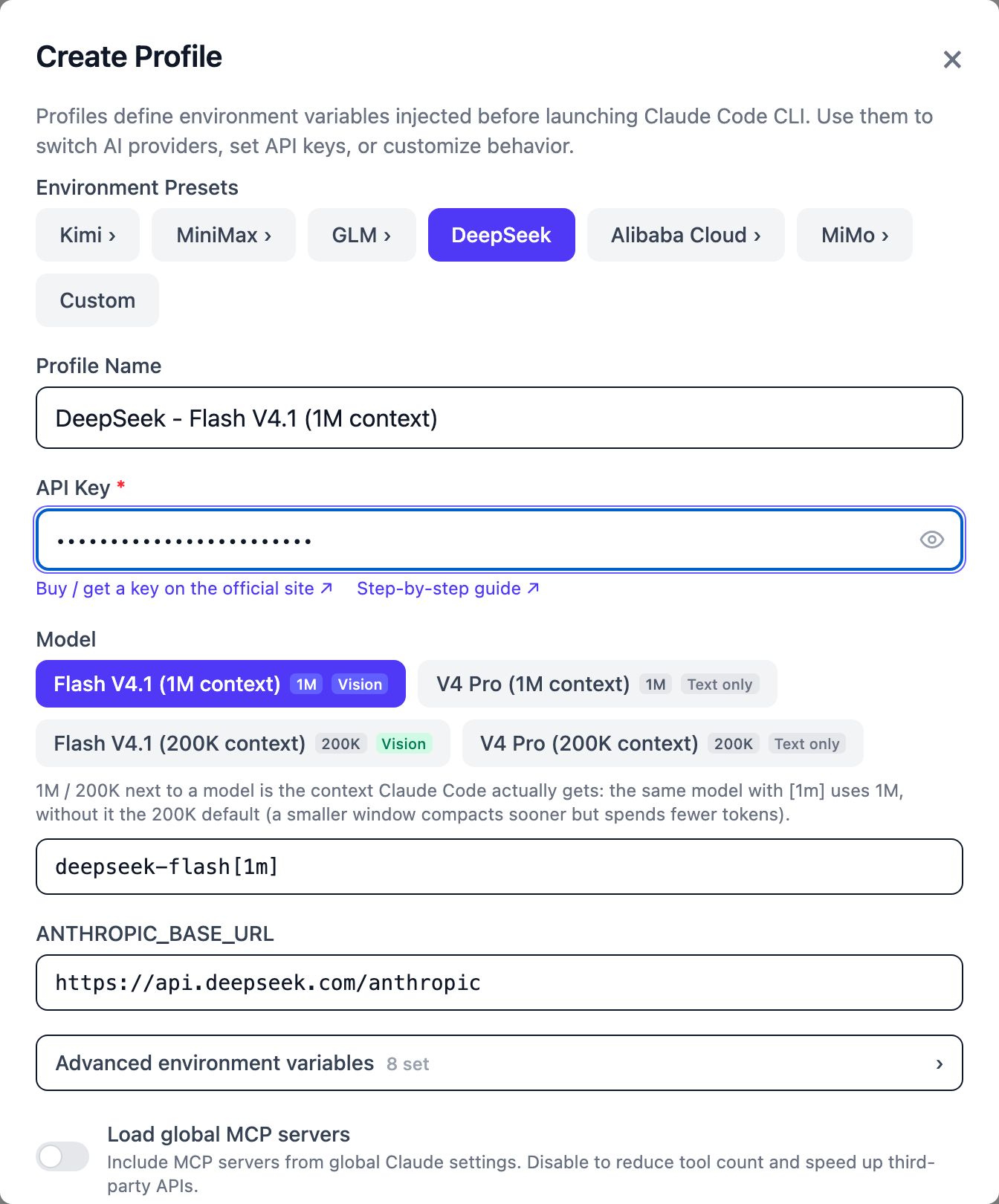
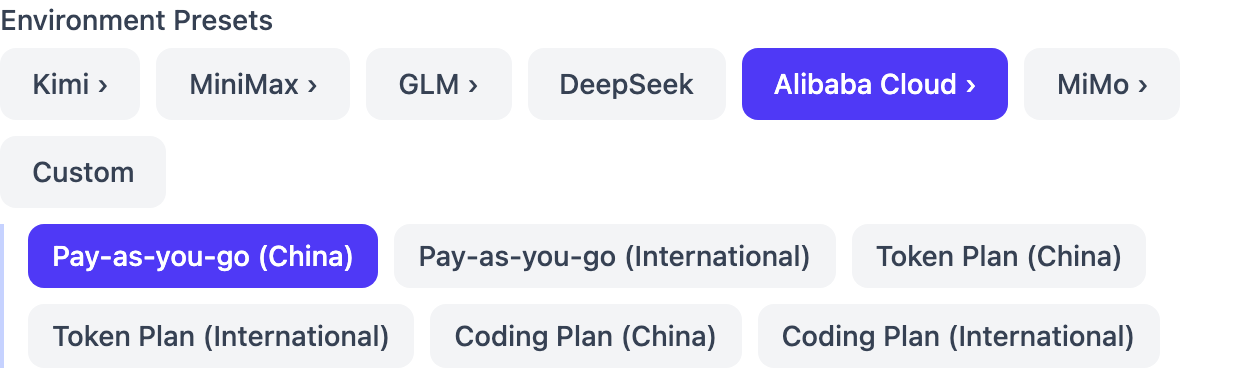
Settings → AI, then click Create Profile in the top right of "AI Profiles". - Under "Environment Presets", click the provider. Every provider except DeepSeek opens a second row of options (China / International, pay-as-you-go / plan) — pick the one that matches your key.
- Paste the key into API Key. Model, endpoint and the rest are filled in by the option you picked — no need to change them.
- Keep Use as my default after creating on, and click Create.
When you click Create, Vibe Seller first tests the connection (the button says "Testing connection…") by sending one tiny real request with your key. It saves only if that works; otherwise it shows "Connection test failed" plus the provider's reason — see the FAQ.
Clicking a provider opens its second row — Alibaba Cloud, for example:
Which option goes with which key:
| Provider | Pay-as-you-go key → pick | Plan key → pick |
|---|---|---|
| DeepSeek | DeepSeek |
(no plan) |
| Kimi (China) | Kimi › Pay-as-you-go (China) |
Kimi › Kimi Code (membership) |
| Kimi (international) | Kimi › Pay-as-you-go (International) |
Kimi › Kimi Code (membership) |
| MiniMax (China) | MiniMax › China |
MiniMax › China — same option; paste the key that matches how you pay |
| MiniMax (international) | MiniMax › International |
MiniMax › International — same |
| Zhipu GLM (China) | GLM › China |
GLM › China — same option; paste the matching key |
| Z.AI (GLM international) | GLM › International |
GLM › International — same |
| Qwen (China) | Alibaba Cloud › Pay-as-you-go (China) |
Alibaba Cloud › Coding Plan (China) or Token Plan (China) — whichever you bought |
| Qwen (international) | Alibaba Cloud › Pay-as-you-go (International) |
Alibaba Cloud › Coding Plan (International) or Token Plan (International) |
| Xiaomi MiMo | MiMo › Pay-as-you-go |
MiMo › Token Plan (China cluster); Singapore / Europe accounts pick Singapore cluster / Europe cluster |
| Claude | the built-in Claude profile |
the built-in Claude profile |
DeepSeek
Pay-as-you-go only — DeepSeek has no plan. Good for a first try for a few dollars.
Pay-as-you-go:
- Open the DeepSeek Platform, sign up and log in. If it asks for identity verification, follow the prompts.
-
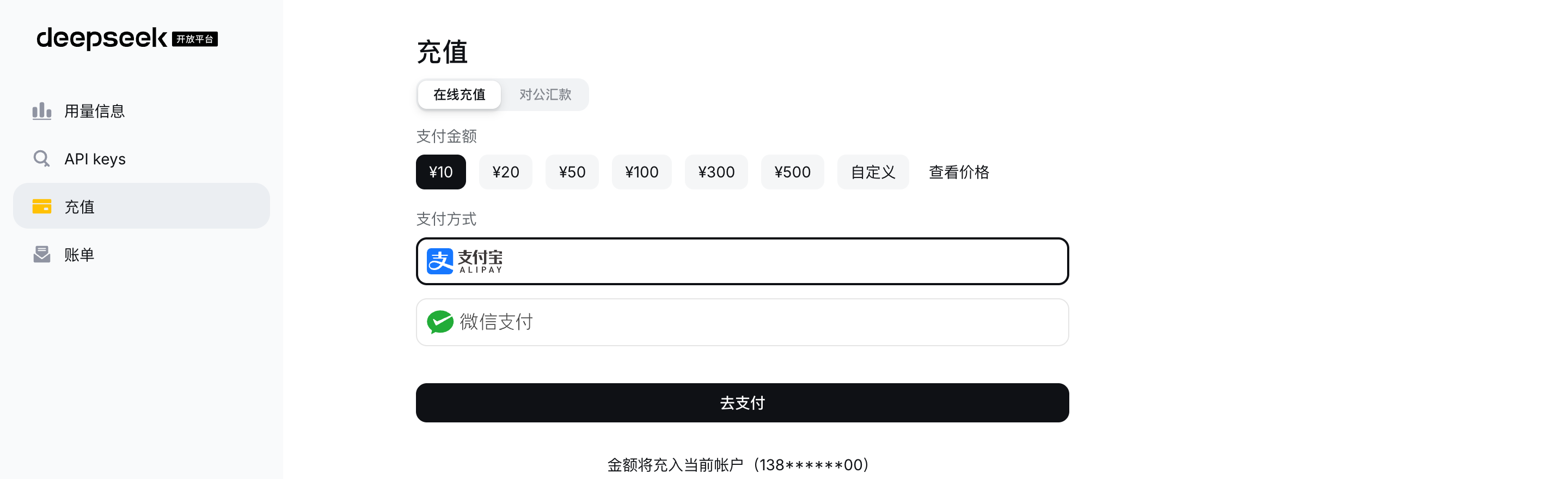
In the left menu click 充值 (Top up — top-up page), pick an amount and a payment method, then click 去支付 (Pay).
-
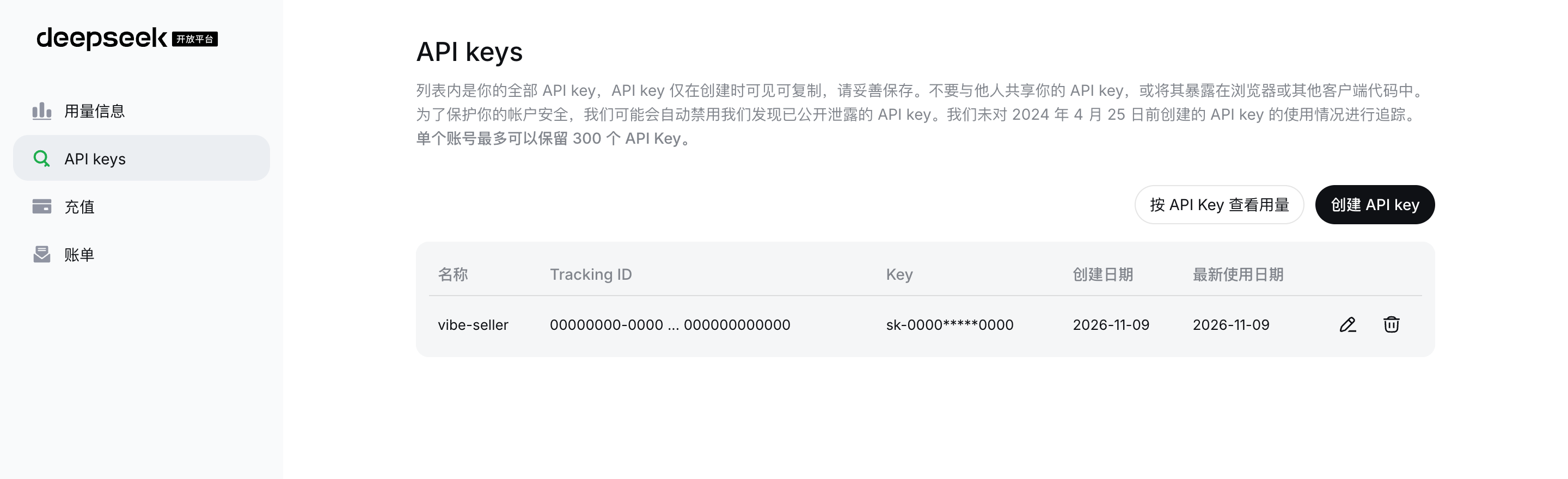
In the left menu click API keys (API Keys page), then 创建 API key (Create API key) in the top right.
-
Give the key a name (e.g.
vibe-seller), click 创建 (Create), and copy it right away — DeepSeek only shows the key when it is created.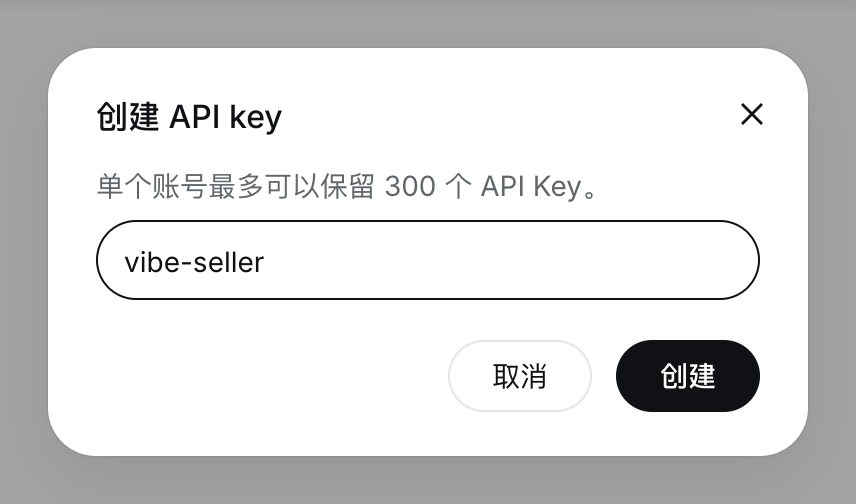
-
In Vibe Seller pick the DeepSeek preset, paste the key, create.
Pitfall: an empty balance returns 402 Insufficient Balance — top up again.
Official docs: error codes.
Kimi
Kimi has both, but the two keys come from two different platforms, so clicking Kimi › in Vibe Seller shows three options.
Plan (Kimi Code, part of a Kimi membership):
- Get a membership on the Kimi membership page. Not every tier includes Kimi Code — check the page before buying.
- Open the Kimi Code Console, click Create API Key, enter a name, confirm, and copy it immediately — once the dialog closes, the full key can't be shown again.
- In Vibe Seller pick Kimi › Kimi Code (membership), paste the key, create.
Pay-as-you-go (Kimi API Platform):
- Sign up on the Kimi API Platform, top up, and create and copy a key on the API Keys page (China accounts: platform.kimi.com).
- In Vibe Seller pick Kimi › Pay-as-you-go (International) (China accounts: Pay-as-you-go (China)), paste the key, create.
Pitfall: the key and the option must come from the same platform — a Kimi
Code key only works with Kimi Code (membership), a platform key only with
Pay-as-you-go, and a China-platform key with China, an international one with
International. On a 401, check this first.
MiniMax
MiniMax has both; its plan is called M Plan (formerly Token Plan). The two keys live on different console pages and are not interchangeable. They use the same endpoint, though, so in Vibe Seller both go into the same option (MiniMax › China for China accounts) — the key you paste decides how you're billed. China accounts sign up on the MiniMax Open Platform.
Pay-as-you-go:
- Top up under 费用管理 → 账户钱包 (Billing → Wallet — balance page).
-
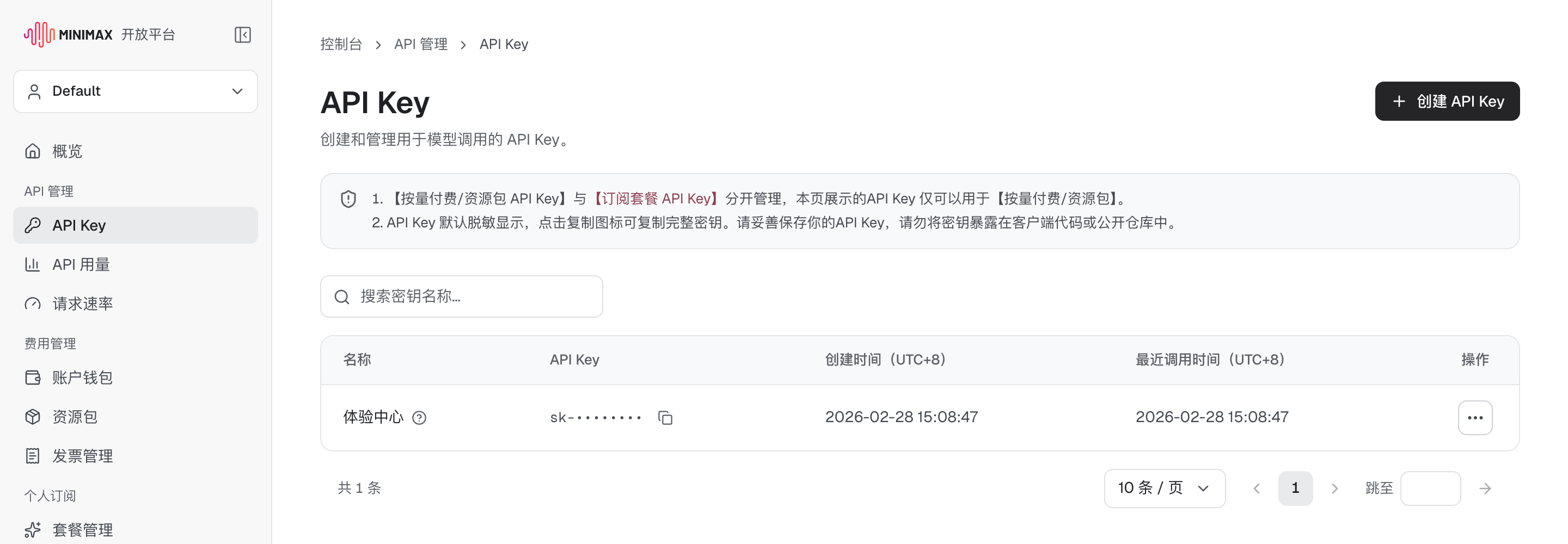
Go to API 管理 → API Key (API Key page), click 创建 API Key (Create API Key) in the top right, and copy it.
-
In Vibe Seller pick MiniMax › China, paste, create.
Plan (M Plan):
- Choose a tier and pay on the plan details page.
-
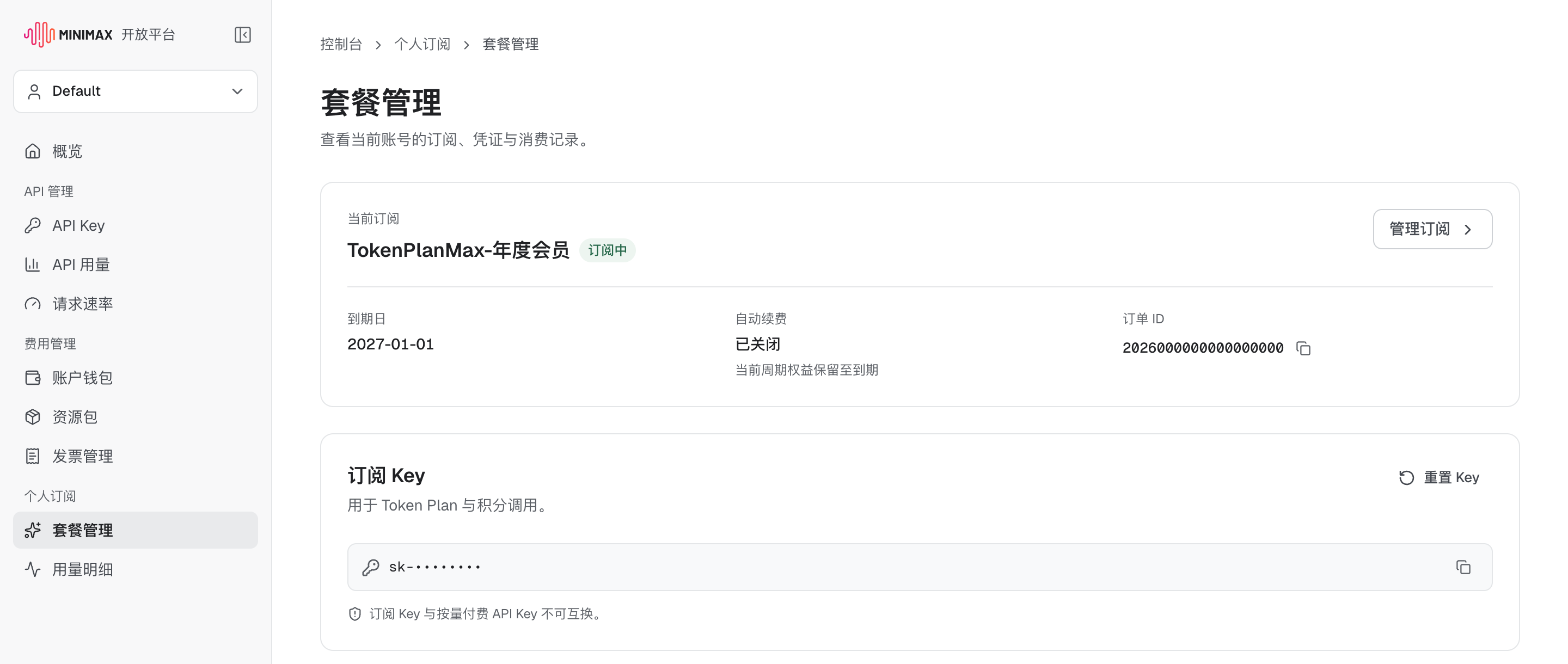
Open 个人订阅 → 套餐管理 (Subscription → Plan management). The 订阅 Key (Subscription Key) at the bottom is your plan key: one per account, shown masked; use the copy icon to copy it, and 重置 Key (Reset Key) if it ever leaks. The page itself says a Subscription Key and a pay-as-you-go API key are not interchangeable.
-
In Vibe Seller pick the same MiniMax › China, paste the Subscription Key, create.
International accounts: sign up at platform.minimax.io;
the menus are API Keys > Create new secret key (pay-as-you-go) and
Billing > M Plan (plan). International keys only work on the international
endpoint, so for either key pick MiniMax › International.
Official docs: Prerequisites.
Zhipu GLM
China users use the Zhipu BigModel platform (preset GLM › China); users
outside China use Z.AI (preset GLM › International). Both have
pay-as-you-go and a GLM Coding Plan. The two keys come from different pages
and aren't interchangeable; in Vibe Seller both go into the same preset, and
the key you paste decides what it bills against.
China: Zhipu BigModel
Click "Register/Login" in the top right of Zhipu BigModel. Real-name verification isn't required to call the API, but Zhipu recommends doing it.
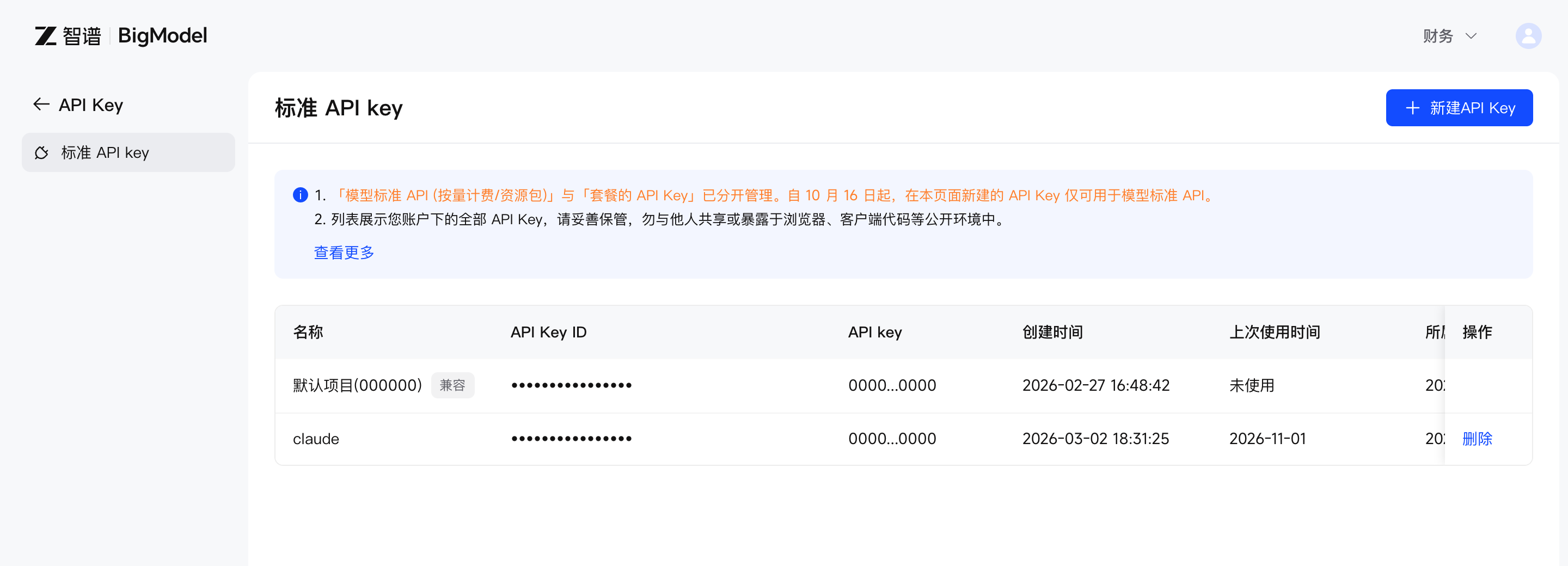
Pay-as-you-go: top up, then on the standard API key page click 新建API Key (New API Key) in the top right. The notice at the top of that page says keys created there are for the standard (pay-as-you-go) API only.
Plan (GLM Coding Plan): buy it with 立即订阅 (Subscribe now) under Coding Plan → 套餐概览 (Plan Overview); after subscribing, create a key under Personal Coding Plan → Plan Overview (team members: Team Coding Plan → My Plan).
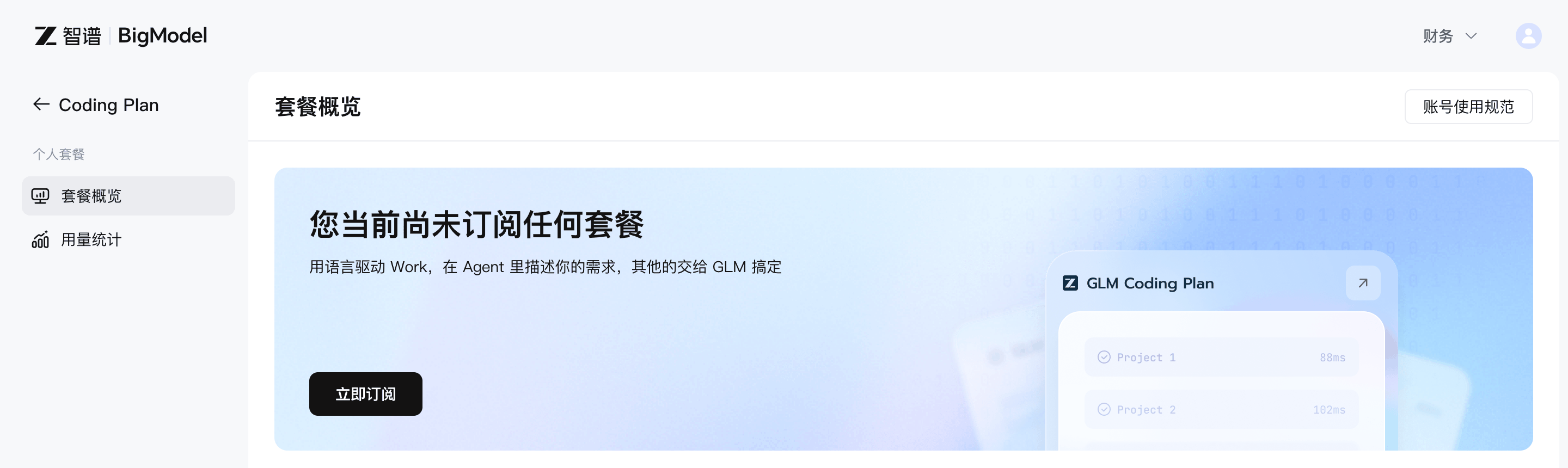
Either key: in Vibe Seller click GLM ›, then China, paste, create.
International: Z.AI
Register or log in on the Z.AI Open Platform.
Pay-as-you-go: create a key under Standard API Key on the API Keys page.
Plan (GLM Coding Plan): subscribe on the plan page, then create a key under Personal Coding Plan on the API Keys page (team plan: Team Coding Plan → My Plan).
Either key: in Vibe Seller click GLM ›, then International, paste, create.
Qwen (Alibaba Cloud Model Studio)
Model Studio (Bailian) has pay-as-you-go and two plans (Coding Plan, Token Plan), each on the China site and the international (Singapore) site. Each kind of key has its own page and its own endpoint, and they must match, so clicking Alibaba Cloud › in Vibe Seller shows six options: three ways to pay × China / International.
Pay-as-you-go:
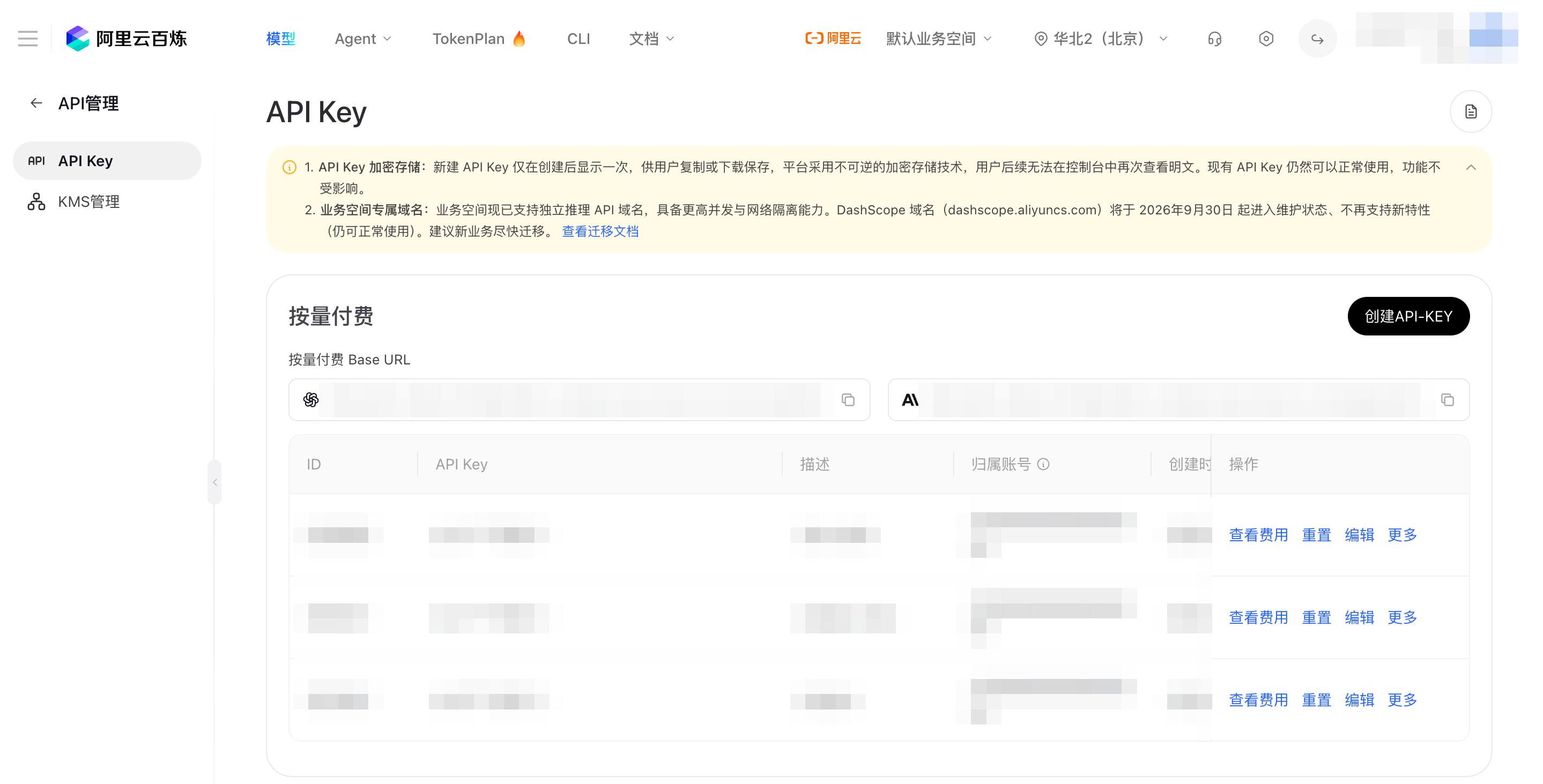
- Open Bailian console → API Key and pick the right region in the top bar first (e.g. 华北2(北京), North China 2 (Beijing) — keys don't work across regions).
-
In the 按量付费 (pay-as-you-go) section click 创建API-KEY (Create API key), leave owner account and workspace at their defaults, set permissions to All, click OK.
-
Copy or download it now — new keys are shown in full only once. The key starts with
sk-. - In Vibe Seller click Alibaba Cloud ›, pick Pay-as-you-go (China), paste, create. International (Singapore) accounts create the key on the API Key page of the international Model Studio console, and pick Pay-as-you-go (International).
Plan (Coding Plan): buy it on the Coding Plan page;
the dedicated key (starting with sk-sp-) is on the same page. In Vibe Seller
pick Alibaba Cloud › Coding Plan (China). International site: buy it on the
ap-southeast-1 Coding Plan page
and pick Coding Plan (International).
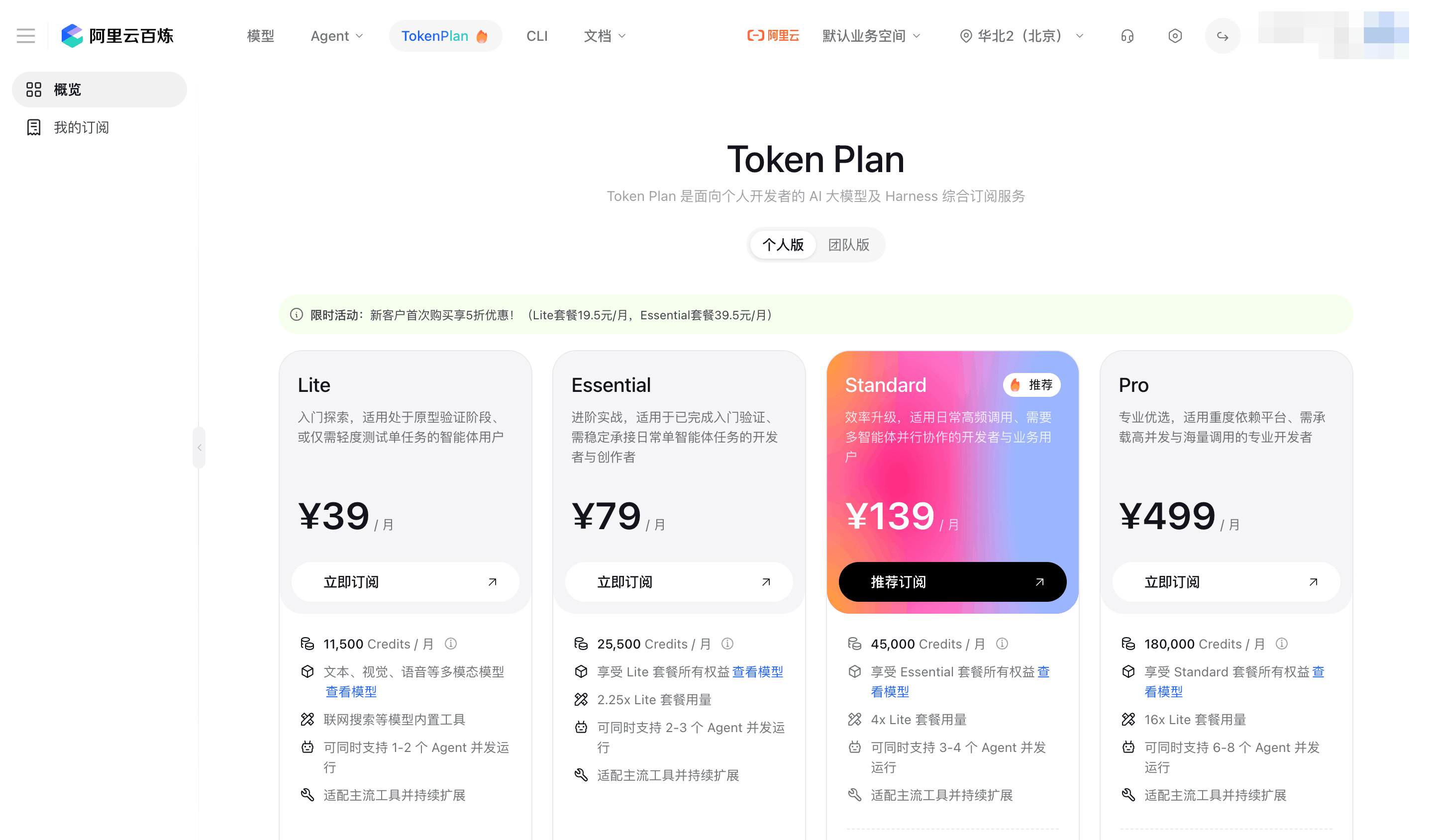
Plan (Token Plan): buy it from TokenPlan in Bailian's top navigation (personal or team edition). After buying, use "Create or view API Key" on the Token Plan personal page; for teams an admin assigns a seat in member management. In Vibe Seller pick Alibaba Cloud › Token Plan (China). International site: get the key on the Token Plan personal page and pick Token Plan (International).
Pitfalls:
401 invalid_api_keyalmost always means the key and option don't match — e.g. a Coding Plansk-sp-key on a pay-as-you-go option, or an international key on a China option. Create the profile again with the matching option.
Official docs: Get an API key (zh).
Xiaomi MiMo
MiMo has both. The two keys aren't interchangeable and use different endpoints, and the Token Plan is split into China, Singapore and Europe clusters, so clicking MiMo › in Vibe Seller shows four options. Log in to the MiMo API Platform with a Xiaomi account (you can register from the login page). Users in mainland China must complete real-name verification (personal or business) before topping up or buying a plan.
Pay-as-you-go:
- Top up under 账户余额 (Account Balance — balance page; overseas: Apple Pay, Google Pay, cards).
-
Under API Keys (API Keys page) click 新建 API Key (New API Key) in the top right — the key starts with
sk-.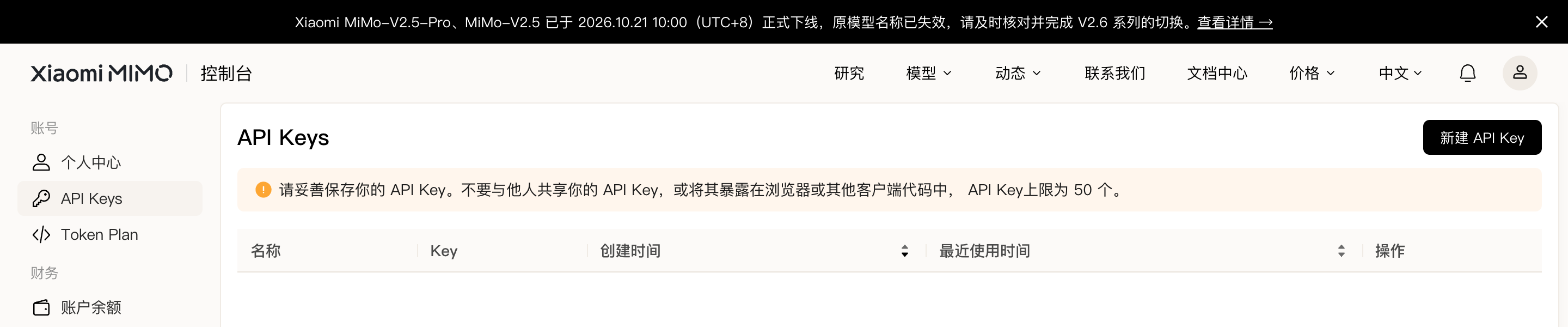
-
In Vibe Seller pick MiMo › Pay-as-you-go, paste, create.
Plan (Token Plan):
-
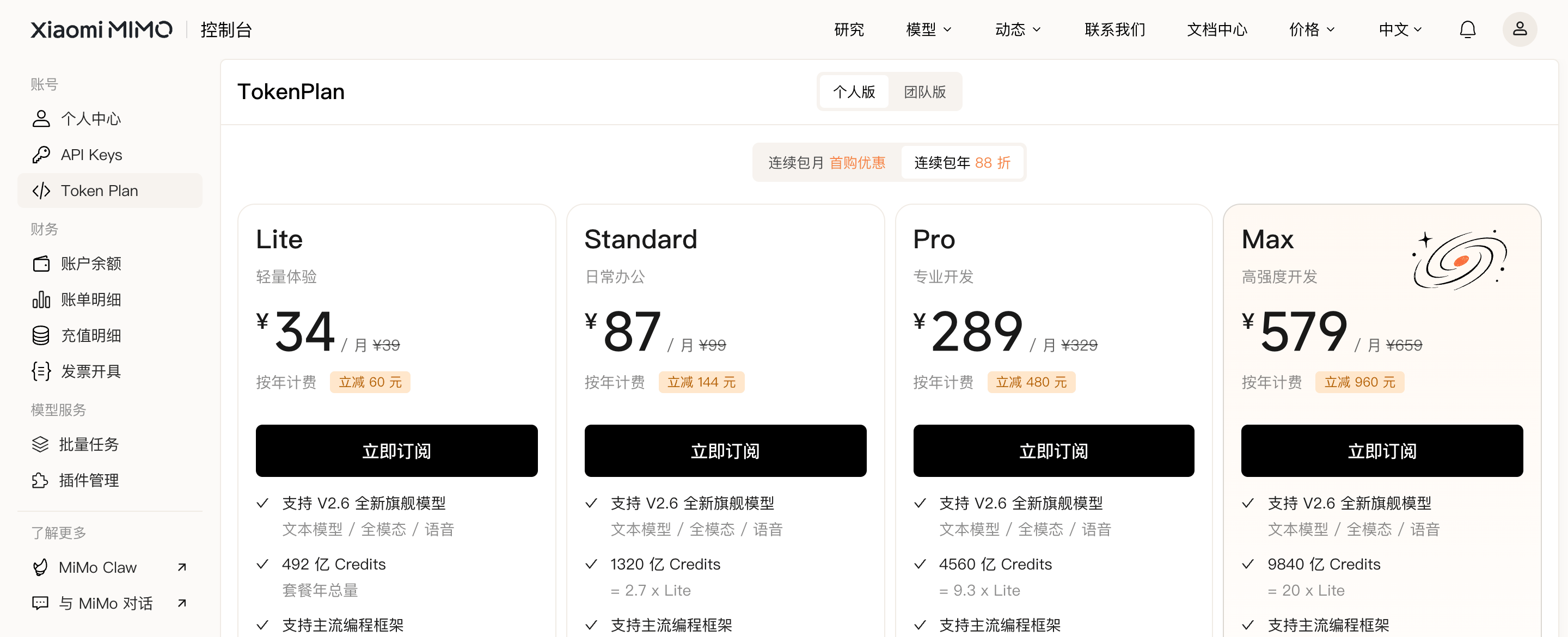
Under Token Plan in the left menu, choose the personal or team edition and a tier, and click 立即订阅 (Subscribe now). Account balance can't pay for a Token Plan; it's bought separately.
-
Get your dedicated key on the Token Plan management page (
tp-for individual,ttp-for team; team plans need a seat assigned first). The same page shows your Base URL:token-plan-cnis the China cluster,token-plan-sgpSingapore,token-plan-amsEurope. - In Vibe Seller pick your cluster's option — MiMo › Token Plan (China cluster) / Token Plan (Singapore cluster) / Token Plan (Europe cluster) — paste, create.
Pitfalls:
sk-pay-as-you-go keys andtp-/ttp-plan keys can't be swapped — pick the matching option; a Token Plan key on the wrong cluster won't connect either.
Official docs: First API call.
Claude
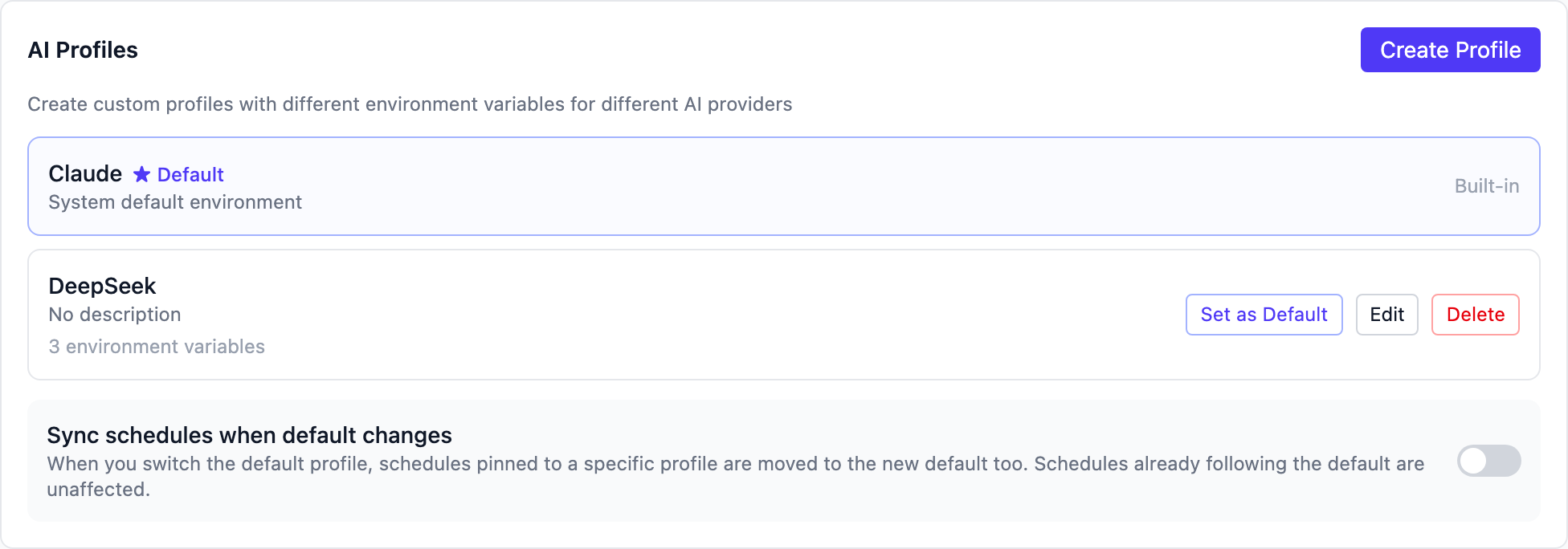
Either way, you sign in to Claude Code on this machine and Vibe Seller's built-in Claude profile ("System default environment") uses that sign-in — no key is pasted into Vibe Seller.
Pay-as-you-go (Claude Console): sign up on the Claude Console and add credit under Billing (keys live on the API keys page). The simplest route is to choose the Console account at step 2 below; Claude Code handles the key for you.
Plan (Claude Pro / Max subscription): subscribe on the pricing page, then sign in with your claude.ai account at step 2 below.
Signing in:
- Install Claude Code following the official setup guide.
- Run
claudein a terminal; a browser login page opens. Choose the claude.ai account or the Console account, depending on how you pay. - When the terminal shows
Login successful, you're done. - Back in Vibe Seller,
Settings → AI: if the "Claude" row has no ★ Default mark, click Set as Default.
Pitfalls:
- Claude is available only in supported countries and regions; check before signing up.
- If you use cc-switch or a similar tool, or have
ANTHROPIC_API_KEYset in your environment, Claude Code uses that instead of your sign-in. Type/statusin Claude Code to see which credential is active.
Official docs: Claude Code authentication, Claude API overview.
FAQ
The key was shown only once and I didn't copy it
You can't get it back, and you don't need to. Delete that key in the provider's console, create a new one, and copy it this time.
I accidentally shared my key / pasted it in a group chat
Immediately delete (or disable / reset) that key in the provider's console
and create a new one. Then in Vibe Seller Settings → AI, find the profile
using it, click Edit, paste the new key into API Key, and click Save.
A leaked key lets anyone spend your money — don't wait.
The connection test says 401 / authentication failed
Check in this order:
- The key was copied completely (no extra spaces, nothing cut off).
- The key hasn't been deleted or expired.
- The key matches the preset — most common: a plan key on a pay-as-you-go preset, or an international key on a China preset.
Insufficient balance (402) / quota exhausted (429)
- Insufficient balance: the pay-as-you-go account is empty — top up.
- 429: too many requests, or your plan quota is used up (the 5-hour or weekly cap). Wait for it to come back, or upgrade; if it's urgent, create a profile for another provider in Vibe Seller to cover in the meantime.
I picked the wrong preset for my plan key
An existing profile can't switch presets when you edit it. Click Create Profile, pick the right preset, paste the key, create, then delete the wrong one.
Where is the key stored? Is it safe?
The key stays inside Vibe Seller on your own machine, encrypted, and is never uploaded anywhere; your machine sends it straight to the provider when calling the model.