Login & Accounts
How do I set up or recover the login password?
There's no login by default. A fresh install opens straight into the main UI. To make people log in first, set it up in Settings → Account:
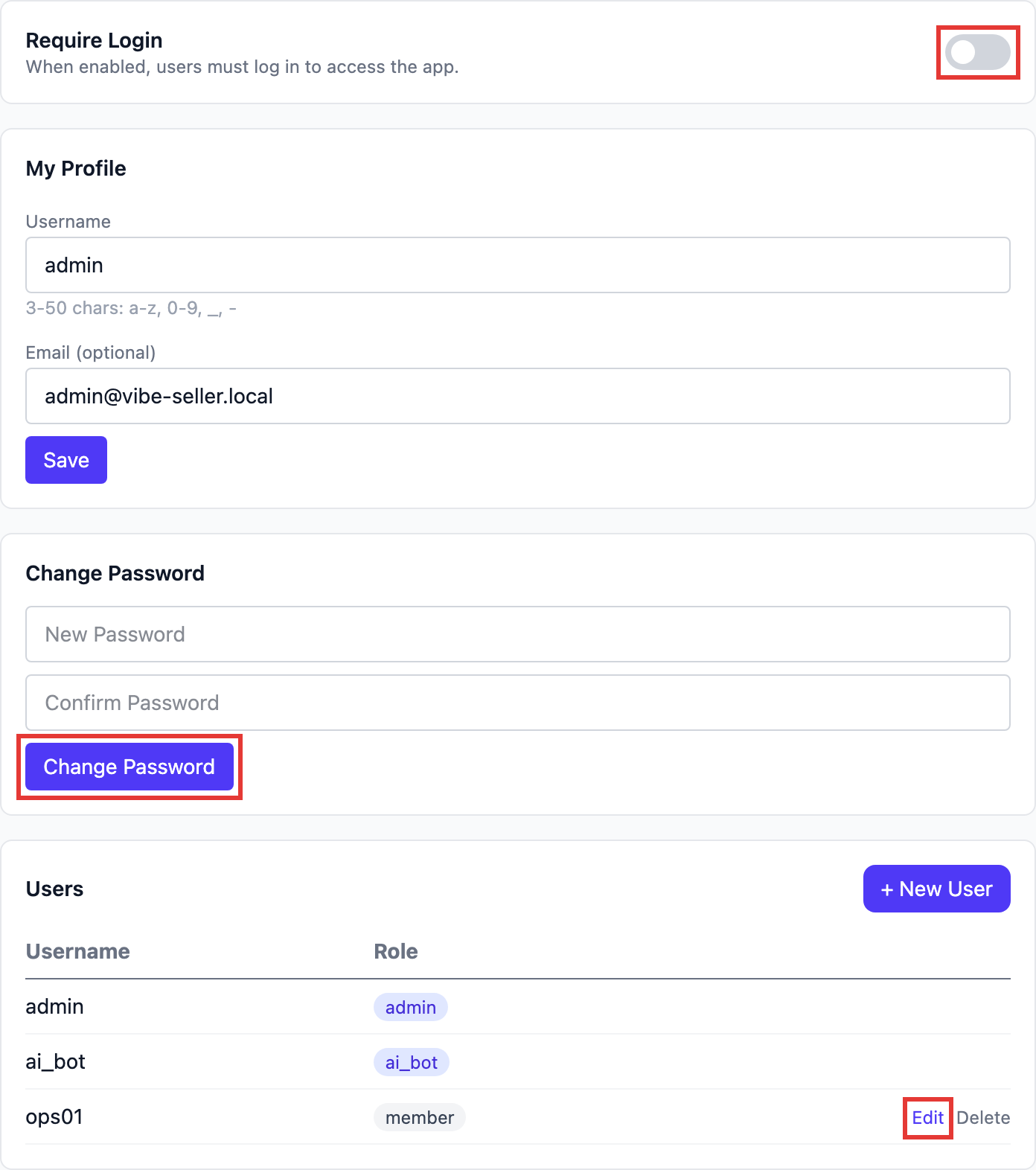
- Change the password first: type a new one under Change Password and click Change Password. While login is still off, you don't need the old one;
- Then turn on Require Login: from now on the web app asks for a login; the username is the one under My Profile;
- Accounts for colleagues: + New User in the Users list. If a colleague forgets their password, an admin clicks Edit on that row, types a new password and saves.
The factory account is admin / admin, valid only until the password is first changed; after
that the old one stops working and can't be looked up.
Locked out and forgot the password? Recover it from a terminal on the machine running Vibe Seller:
vibe-seller reset-auth status
vibe-seller reset-auth password
vibe-seller reset-auth disable
status: whether login is on, which accounts can log in, whether the default still works;password: reset the default admin's password — it prompts for the new one;disable: emergency — turn the login page off, get in, then fix the password in Settings → Account.
Changes apply immediately — no restart, running tasks unaffected. Another account: add
--user <name>. With the login page off, anyone who can open the address gets in; fine on your own
network, never expose it to the internet. Turn Require Login back on in Settings → Account
afterwards, or run vibe-seller reset-auth enable.
A source install (cloned and run from the repo) has no vibe-seller command; use
scripts/reset_auth.sh (scripts\reset_auth.bat on Windows) with the same arguments.
Changing a password doesn't log anyone out
Browsers that are already logged in stay in, for up to 24 hours. To force everyone back to the
login page: stop the server, delete ~/.vibe-seller/data/jwt_secret, start it again. That file
also encrypts the Ziniao, mailbox and Ads API credentials you've saved, so they'll all need to be
entered again; to lock out one person, just change their password.
Why is there no vibe-seller command on Windows?
Because the native installer doesn't put it on your PATH — and on Windows you don't need it: the tray owns the server (right-click the icon → Restart server / Quit), it starts when you log in, and upgrades run from tray → Check for updates.
If you do want the command line (for the reset-auth commands above, say), the executable is inside the install:
& "$env:LOCALAPPDATA\Programs\VibeSeller\.venv\Scripts\vibe-seller.exe" reset-auth status
vibe-seller start / stop / upgrade live on that same file, but the installer handles autostart and upgrades on Windows, so you rarely reach for it.
The vibe-seller command is the entry point for the macOS / Linux (and WSL2 Ubuntu) install, where install.sh puts it in ~/.local/bin.